
Window 8 is developed to catch the mobile computing Market share. So that Microsoft’s latest operating system has stylish modern design and Tiles metro User Interface.
Microsoft’s Windows 8 developer preview have come us with an interface steeped in new Metro style — its tile-centric start screen is sleek, fresh, and downright pretty. Now you can download the New Metro Style Windows 8 theme for free from developers at DA.
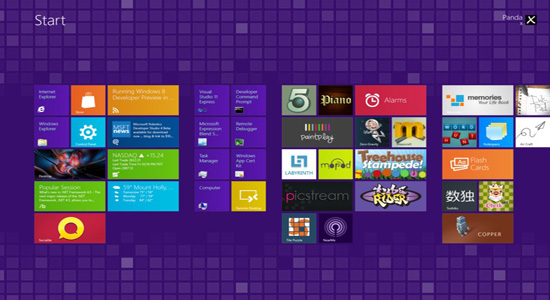
How to Install Metro Style Theme In Windows 8:
step 1. Download the Windows 8 Purple Theme
Step 2: Run takeownership.bat as administrator (Right click Run as Administrator)
Step 3: Then navigate to C:WindowsSystem32 and rename uxtheme.dll to uxtheme.dll.old and shsxs.dll to shsxs.dll.old
Copy the included uxtheme.dll and shsxs.dll into System32
Reboot and enjoy!
To Uninstall Windows 8 Metro Theme:
- To uninstall run uninstall.bat as administrator
Note :The uxtheme.dll.backup and shsxs.dll.backup in System32 are for the uninstaller, don’t delete them.
Download Purple Metro Theme
Also Read : Top 30 Best Windows 8 Themes, Visual Styles and Skins


